|
|
| . |
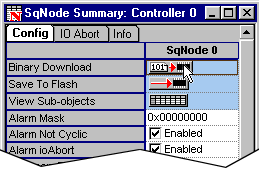
Motion ConsoleDownload Node FPGAsMotion Engineering's SynqNet nodes are shipped with boot FPGA images (*.sff). The boot image contains minimal functionality to allow the node to be accessed by the SynqNet controller. To use the node, you will first need to download the appropriate FPGA (runtime) image. To find the appropriate FPGA (runtime) image that should be downloaded for your node, please refer to the Node Binary Files: Product Table. There are two ways to download the Node FPGA: Motion Console DownloadIn the SynqNet Node Summary window, click on the Binary Download button.
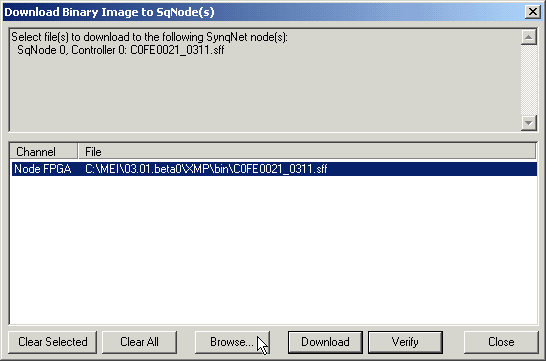
Another window will appear that shows ... Click Browse.
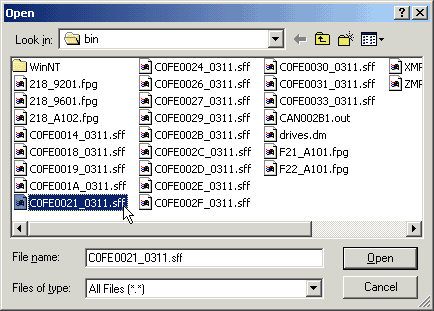
Find the appropriate FPGA file and select Open. In this example, we are downloading the C0FE0021_0311.sff file for an RMB-10V2.
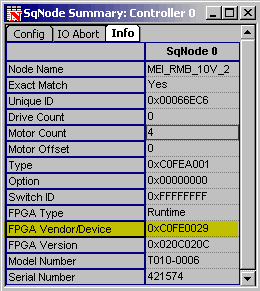
Refresh Motion Console by maximizing the screen. The following screen should appear. Notice that the "FPGA Vendor/Device" now reflects the downloaded FPGA: 0xC0FE0029.
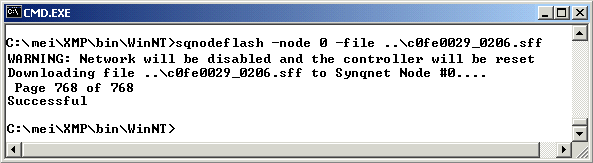
Command Prompt DownloadOpen a Command Prompt window and go to the following directory to download the proper *.sff file: C:\MEI\XMP\bin\WinNT\sqNodeFlash -node 0 -file ..\c0fe0029_0206.sff
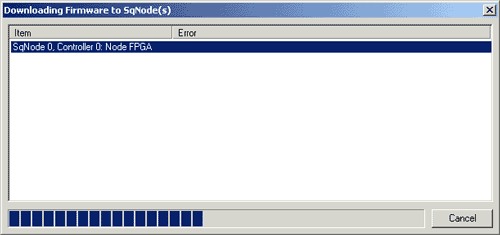
The selected FPGA file has been downloaded after all of the pages have been counted. Refresh Motion Console by maximizing the screen. The following screen should appear. Notice that the "FPGA Vendor/Device" now reflects the downloaded FPGA: 0xC0FE0029.
|
||||||||
|
| | Copyright © 2001-2021 Motion Engineering |