|
|
| . |
|
Thread Helpers (for Windows Forms) OverviewThe MpxUtil.Thread class contains shared methods used to work with threads in MPX applications. Shared (or Static in C#) methods are methods that do not require an object. In this sense, they are similar to free functions in other programming languages. The .NET platform does not have free functions. Thread.DelayDelay safely puts the current thread to sleep. If called from a GUI thread, Delay will call Application.DoEvents which will allow other GUI events to be processed. If Delay is not called from a GUI thread, then Delay simply calls System.Threading.Thread.Sleep. Calling Delay without a millisecondsTimeout argument will simply allow other threads or other GUI events to be processed. If no other threads or events need to be processed, then Delay will return immediately. Visual Basic
C#
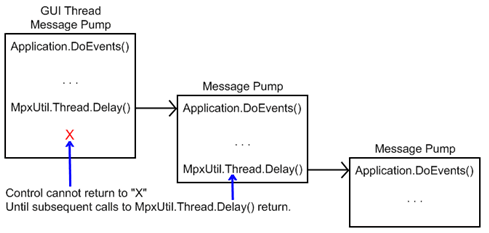
Note: If Delay is called from a GUI thread, it is possible for Delay to be called a second time from the GUI thread. In this case, the first Delay cannot return until all subsequent Delay functions return. While Delay is intended to make working with GUI applications easier, it is important to be aware of this limitation. If this limitation presents a problem, it is best to run tasks in non-GUI threads. Within GUI threads, MpxUtil.WaitForEvent and MpxUtil.Motion.WaitForDone make calls to Delay internally and, consequently, share this limitation.
Thread.WaitForEventWaitForEvent waits for a controller event to occur. The overloads with a objectNumber argument will wait until the requested event occurs on an object whose Number property matches objectNumber. The overloads without a millisecondsTimeout argument will wait indefinitely for an event to occur. The overloads with a millisecondsTimeout argument will return a Boolean value indicating whether the event occurred. True is returned if the event occured. False is returned if the event did not occur. Note: WaitForEvent does not enable event reporting for any MPX object. Event reporting must be enabled by setting the EventEnable property or EventEnableAll method for the appropriate object. Note: When called from a GUI thread, WaitForEvent uses MpxUtil.Thread.Delay internally to allow other GUI events to be processed. If WaitForEvent is called from the GUI thread, then WaitForEvent may not return immediately if another operation in the GUI thread takes a long time to execute. Please see the note on MpxUtil.Thread.Delay for more information.
Visual Basic
C#
|
||||||||||||||||
| | | Copyright © 2001-2021 Motion Engineering |