IO Abort
The IO Abort is a safety feature in the FPGA logic for SynqNet nodes. Its purpose is to put a Node's I/O into a safe state when a serious problem occurs on the network. The input trigger conditions for the IO Abort are software configurable. By default, the Synq Lost is the only condition that could cause an IO Abort.
When an IO Abort occurs:
| |
- ALL node outputs are disabled (set to the power-on condition).
- An ABORT action is commanded to ALL axes associated with the node. This will cause the axes and motion supervisors to enter into an error state.
|
FPGA IO Abort Functionality
When an IO Abort occurs, it changes the states of several parameters inside the FPGA. See the table below to see what happens in the FPGA during and after an IOAbort.
| |
State during
IOAbort |
State after
IOAbort |
pulse
(Step/Dir or CW/CCW) |
Terminates current pulse cycle. Disables pulse engine. |
Resumes pulse operation using new data from firmware. |
nodeIoSpi
(SQID) |
Digital I/O outputs are disabled. |
Digital I/O outputs are enabled. |
nodeIoSlice
(Slice-I/O) |
STOP command is issued.
Slice I/O Modules = Fault State |
Cyclic Communication |
gpio
(General Purpose I/O) |
All I/O are set to Inputs |
I/O goes back to configured directions |
dac7849
(DACs) |
Reset State
(Output Voltage = 0V) |
Normal State |
| ampEnable |
Inactive State |
Software Configured State |
| brakeRelease |
Inactive State |
Software Configured State |
To recover from an IO Abort:
| |
- The input trigger conditions must be cleared. Depending on the cause of the IO Abort, one or more of the following may be required to clear the trigger condition:
| Synq Lost |
The SynqNet network must be re-initialized to the SYNQ state. |
| Node Disable |
The Node Disable input bit must be set to the inactive state. |
| Power Fault |
The condition that triggered the Power Fault bit must be corrected. Since this bit is node specific, please consult the node/drive manufacturer's hardware documentation for details. |
| User Fault |
The condition that triggered the User Fault bit must be corrected. |
- After the trigger condition is corrected, the node status bit(s) that caused the IO Abort must be cleared with mpiSqNodeStatusClear.
- Then, the Motion Supervisor and Axis error states should be cleared with mpiMotionAction (.., MPIActionRESET).
|
Configuration
Motion Console
IOAbort Mask
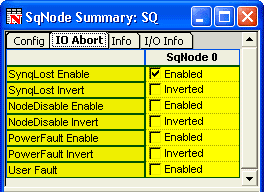
You can set the IOAbort Mask in the SqNode Summary > IO Abort.
MPI
The input trigger conditions for the IO Abort can be configured with mpiSqNodeConfigGet/Set using the MPISqNodeConfigIoAbort structure. The input trigger conditions can be individually enabled/disabled and the input signal can be inverted.
Events
When an IO Abort occurs, the controller will generate an MPIEventTypeSQNODE_IO_ABORT status/event. The status can be read with mpiSqNodeStatus decoding the eventMask with mpiEventMaskBitGET (eventMask, MPIEventTypeSQNODE_IO_ABORT). After the SQNODE_IO_ABORT status/event occurs, the status/event can be cleared with mpiSqNodeEventReset. This will allow another SQNODE_IO_ABORT status/event to be triggered.
If an IO Abort occurs, the controller will also generate a status/event for the conditions that generated the IO Abort. An application can determine the cause of the IO Abort by reading the status with mpiSqNodeStatus, decoding the eventMask with the following event types:
MPIEventTypeSQNODE_NODE_DISABLE
MPIEventTypeSQNODE_NODE_ALARM
MPIEventTypeSQNODE_ANALOG_POWER_FAULT
MPIEventTypeSQNODE_USER_FAULT
See Also
MPIEventType
|

