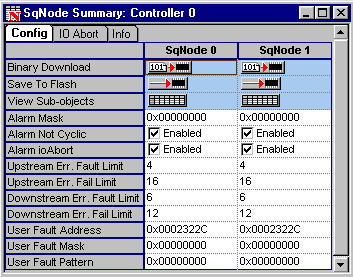
After the proper drive firmware has been downloaded,
click on the
button to check the SqNode Summary window to make sure that the proper
number of drives were found.
This window provides the node configuration for each
drive installed on the system. SynqNet will find the drives in the order
that they are connected. The hardware setup used for this example had
two drives.



 button to check the SqNode Summary window to make sure that the proper
number of drives were found.
button to check the SqNode Summary window to make sure that the proper
number of drives were found.