|
|
| . |
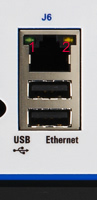
Ethernet LEDs eZMP-SynqNet Hardware > LEDs The Ethernet port has two LEDs: Link/Act and 10/100. The Link/Act LED should be ON at each end of the Ethernet cable. If the Link/Act LED is not ON, it usually indicates that there is a bad connection or a bad cable. See the table below for the meaning of each LED and its state.
|
||||||||||||||
| | | Copyright © 2001-2021 Motion Engineering |