How to Install the MPI App Wizard
for .NET Compilers
Download and open the MPI
App Wizard For Dot Net Install.zip file.
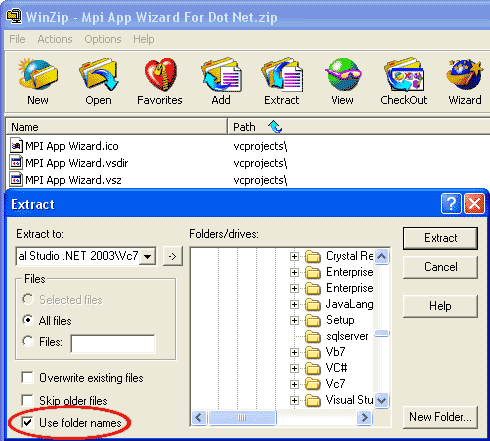
Check the "Use Folder Names" checkbox in WinZip® (as
shown below) and extract files to the "VC" directory of your compiler's
installation directory. This will basically load a new "MPI"
template into Visual SourceSafe so that you can use it to create an MPI
sample application. Typically, these directories are:
For Visual Studio 2003 .NET:
<Drive>\Program Files\Microsoft Visual
Studio .NET 2003\Vc7
For Visual Studio 8:
<Drive>\Program Files\Microsoft Visual
Studio 8\VC
After you have completed the installation, proceed to
the next step and learn How to Use the MPI App Wizard.
|

